Showing posts with label first_steps. Show all posts

2017/07/02

This one's old

That one I did 2 months ago. Simply forgot to include him in the latest post. 


It was kind of important for me though. The main reason is I learned a lot about correct topology.
It doesn't mean that I became good at it at that point - just a little bit more aware of what it should look like.


If you check the name of picture you'll see that it's "Woman_face_2_DX_RX". 
D is from Day, R is from Render. Every day has different render count. 

The funny thing is that I was painting and sculpting only females and this one started as one as well.
I remember that I left the naming convention as it was because I wanted to make some point about that...I don't remember what point tho' - Sorry.


I've changed her face lil' bit and that's what came out.


Refined it further,


and further,


and further.


Then I retopologized him,


and applied a normal map baked from that high-res mesh.


It didn't look good so I retopologized it once again from a scratch, baked another normal map and it was even worse...


So I repeated that few more times and that's how it came out at the end.
I made few mistakes and the biggest are:
-bad topology (with too many poles in places they shouldn't be) which was creating those triangular darker artefacts;
-baking the normal map with too low tolerance (it's called ray distance), which was creating some of those artefacts;
-applying normal map in a wrong way, which wasn't showing correct "fake" geometry distortion and details.


I've learned a lot since then.
I'll post some more recent stuff later.

That's it,
So long

2017/04/27

Female head model - part 2

current verison*


old version*


I fixed the eyelids and jaw, remodelled eye from a scratch, and switch to Cycles render engine.
That way I was finally able to give her more skinny colour. Nothing fancy yet though. Just a simple diffuse + glossy shader.
No fresnel, no reflectivity. 
I already started the retopo process.

TO DO LIST:

-fixing what has to be fixed;
-recreating eyeballs;
-retopo and  UV unwrapping;
-texturing;
-creating some normal , ambient occlusion and specularity maps;
-exporting to Unreal Engine 4;
-MAYBE rigging, animating and putting some hair on.

That's it.
So long

2017/04/17

Sculpting the skull in digital clay

I was out of my place for a week and I didn't have my tablet with me, so I decided to try something else.
I sucked the Blender on my machine and with a small help of the internet I started sculpting process.
After 2 hours of toying with sculpting plugin and its dynamic topology function I came up with high resolution model of the skull.


Most of the time I worked on clay-like material but for the sake of presentation I changed it to what you see.
You can always change it in the panel that shows after pressing 'N' key in 3D viewport as long as you're using the Cycles Render engine.
It doesn't affect the render and is visible only with solid shading option ticked.


Any ways after I sclupted that beauty (right...) I retopologized it - meaning I created brand new model but using like milion less vertices. 
Then I baked normal map and applied it to my low poli model.


For some reason (I'll get why sooner or later) blender switched green and red channel so the teeth looked like the were concave.

The easy fix to that was to switch them like that


   --->   


I have to learn a lot about rendering, presentation, camera and stuff like that but first I want to learn how to texture stuff. 
Not like PBR stuff but more like handpained textures with custom reflectivity masks.


If you want to try that entire 3D thingy I put some links that helped me a lot. Non-profit.


And the last one is Blender: how to retopo a head in few minutes with bsurfaces by Jose Antonio Molinero Reina which I haven't used yet. Seems like it could help me big time with entire retopo process.


That's it.
So long

2016/06/03

Old Stuff 4

Wanna see something funny (or rather sad)?

Stuff that's so bad, it can give you a cancer. Mostly late 2013 and early 2014.
Today (or whatever day you are reading this) - tips and trick on how to NOT draw human face and how to NOT do correct brushwork.

1. Face so flat it could be used as table. Really ugly table. Believe or not - I was proud of this.


2. And here I was trying to figure out how to paint an iris. For what I've noticed - the more saturated and brighter the iris is, the more non-human it looks. But that may be wrong observation. Try it yourself.


3. My frist attempts on drawing skulls and learning the basics of head anatomy, and how it roughly translates on to the face structure.

So yeah... I was that bad or even worse.
Maybe I'll post something more recent next time. Maybe I won't.

So long.

2016/01/11

The 3D stuff - beginings


Hi,
Long time no see.
January is the month of exams and stuff for most of students, and since I'm one myself, I'm pretty busy.
The fact that, if I ware a Power Ranger, my Zord would be a sloth, doesn't seem to help, either.

Any ways, I wasn't totally unproductive. I sat my ass in front of Blender (the 3d program, not the one from kitchen...), saw few tutorials, and made the use of them.
I based work-flow on one tutorial, made by Lance Wilkinson, and kinda ripped of the vibe of weapon. I mean I made everything by myself, but the process is the same, and look of it is similar, although my dagger is a bit "darker".

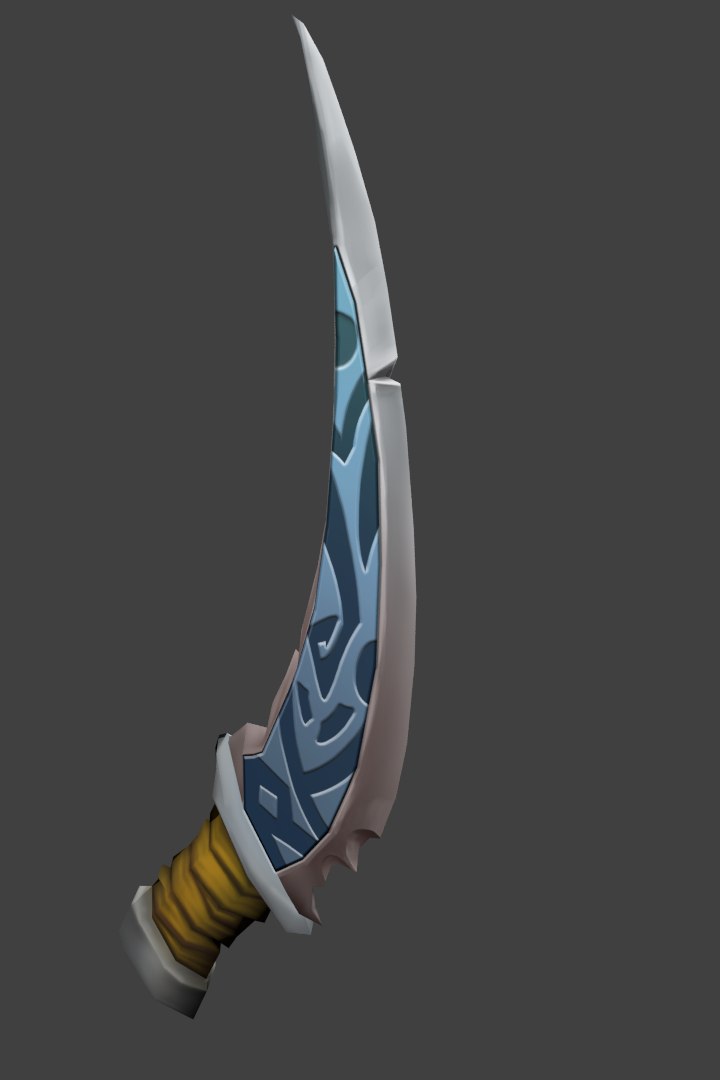
1. Concept of dagger drew myself. It's easier than I thought.


2. Then I sculpted it in Blender.
It has 204 vertices, 240 faces and 404 tris, so it's low polygonal mesh.


Why I went for the low-poly model?
Every object that you see in games, consists of faces and vertices. Lets say we've got simple cube. Six faces, 8 vertices - it seems like nothing. It's not that simple. Computer doesn't know if that faces are attached to the other, so it makes (6 faces)*(4 vertices for each face) == 24 vertices.
Still nothing? Remember that our cube has to exist in the 3 dimensional space - if not, It wouldn't be a cube. That means Every vertex has XYZ axis data. (24 vertices)*(3 axis)= 72 numbers describing the position in world. I forgot to mention that the world position has to be in some kind of relation to these vertices, every vertex has triplet of variables (or quartet when it comes to visibility) describing RGB color (orRGBa) in vertex shader, triplet (quartet) that describes color that radiates from vertex on the face it's attached to, and so on, and on, and on... and it's still a simple cube.
The point is: The more vertices/faces you got, the bigger shitload of data your computer has to compute.
In modern games programmers and 3d artists are using lots and lots of tricks to fool our eyes, to believe that something is prettier than it is in real.


3. Exported UVs layout (that spider-web thingy for these who don't know) as *.png file, and started to draw on top of them.


4. After few iterations I ended up with blade like this.


5. At the end added some details and dirt to make it look more used.

The final texture looks like this:


and has 1024x1024 pixels. For that low-poly mesh it's already overkill in my opinion. 

You can easily notice how flat the surface is. Originally I indented to create normal map for that dagger, but that would require high-poly mesh, or at least few hours of playing with texture baking... and since it's a low-poly mesh, and that hand painted texture already gives the illusion of depth, it would not be worth it.

Wait! What the hell is that "Normal map" Well... that creates the illusion of bumpiness on flat surfaces. You can find more on wiki HERE.

And if you want to see Lance Wilkinson's tutorial you can buy them THERE. That costs 8 bucks for 4 hours long video tutorial (entire series), 3d meshes, and textures, so worth it.

So long

2015/12/25

Old stuff 3

I was drawing a little this week. Really. I just didn't feel like I was suppose to save what I drew.

Any ways I have next batch of old stuff. Enjoy.

Back in 2013 I thought I can learn how to draw at decent level in 2 years. Well... Life happened and it turned out I would need a miracle to do this.
I was "studying" perspective, and all... These are few of exercises I was doing.

Long time ago in a land far, far away the author of that post lived in perfect harmony with the surrounding him world. One day, totally out of blue, he decided to be a concept-design artist so he started to observe and learn perspective by drawing on the top of the car photos the perspective grid.
At least he thought he did.


I did 20-30 of these /\ . And then this \/


/\ That's simple, but forces you to think in three dimensions. I have done maybe 30-40 of these before I even started to draw. Really.


/\ Then I started to draw really simple, rough representation of scenes, toys, pretty much everything I could think of, in 3d space, using horizon line, vanishing points and all of that. 1-point perspective and 2-point perspective is pretty much all I was practicing at the time. Oh.. and why that saloon is from 2016? It is kinda obvious it's from 2014.


Recently I started draw people, study anatomy, and frankly, I think I should have stick to that whole perspective thing.

So long.